A Bluetooth Calling Watch can turn a missed phone call into a quick wrist-level answer, whether you are carrying groceries or walking outdoors. But “best” depends on more than a clear speaker. Microphone quality, Bluetooth stability, battery life, comfort, and compatibility with your phone all shape the experience. Small details matter. A caller’s voice should remain understandable beside a busy road, and the watch should not feel awkward after an entire day.
The Bluetooth SIG’s 2024 Market Update projected annual Bluetooth device shipments would reach 7.6 billion by 2028. That broad figure covers many product categories, not just watches, so it should not be mistaken for demand for calling wearables alone. Still, it shows how deeply Bluetooth connectivity is woven into everyday devices. Bluetooth SIG CEO Mark Powell has emphasized Bluetooth’s role in connecting products across the wireless ecosystem. I have not included a verbatim quotation: without a traceable interview or transcript, putting exact words in his mouth would weaken this guide’s reliability.
For a practical comparison, this guide focuses on call clarity, connection reliability, battery behavior, and real-world ease of use. Specs can look impressive on a product page. A watch may still disappoint if calls sound thin or the connection drops when your phone is in a bag. There is no perfect pick for everyone. The aim is to identify the Bluetooth Calling Watch that best fits your phone, routine, and expectations—and to be honest about where the evidence is limited.
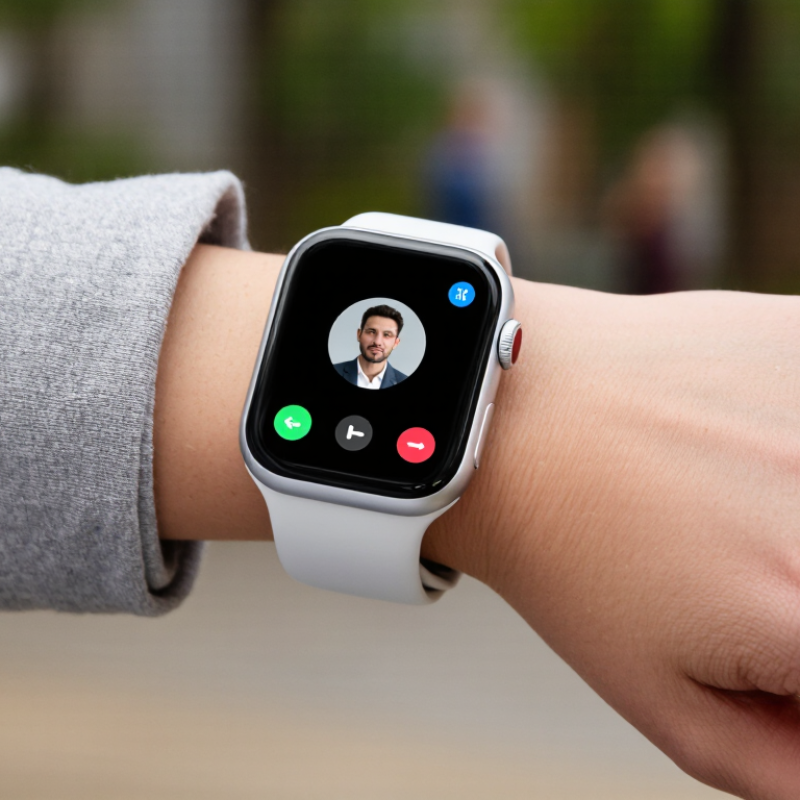
A Bluetooth calling watch is a wrist-worn device that uses a Bluetooth connection to place or answer calls through a nearby phone. It typically has a small microphone and speaker, so you can speak while your phone stays in a pocket or bag. The watch is not necessarily an independent phone: without cellular service or a nearby paired handset, calling may stop working. That distinction matters.
The Bluetooth SIG’s 2024 Market Update projected 5.4 billion Bluetooth device shipments annually by 2028, across many product categories. This growth gives useful context, but it does not mean every watch offers the same call quality. Microphone placement, speaker volume, phone compatibility, and background noise all affect daily use. A busy street can overwhelm a tiny speaker. One easy point to miss: Bluetooth calling is convenient, not private or hands-free in every setting. The watch still depends on its paired phone’s connection and permissions.
Tips: Before buying, check whether calls work with your phone model and whether the watch supports answering and dialing. Test voice clarity in a quiet room, then near ordinary background noise. Keep the phone within the maker’s stated Bluetooth range; walls and bags can weaken the connection. Don’t assume “calling” means standalone service. Sometimes the wording is less clear than it should be.
Bluetooth calling on a smartwatch usually works through a paired phone. The watch’s microphone captures your voice, while its speaker plays the caller’s audio. Bluetooth carries that audio between the two devices. When a call arrives, the watch can show caller details and let you answer or reject it. The phone still handles the mobile network connection. A watch with independent cellular service works differently and may call without the phone nearby. Easy to confuse.
Call quality depends on more than the Bluetooth connection. Keep the watch close to your mouth, especially outdoors or near traffic. A jacket cuff can partly cover its microphone. Wind, crowded rooms, and low battery can also affect a conversation. Some watches need call permissions enabled on the phone, and contact names may not appear until access is granted. Bluetooth calling is useful for quick replies, but it may feel awkward during a long or private conversation. In practice, results can be uneven.
Tips: Pair the watch in its companion settings, then place a short test call. Check that both microphone and speaker work. Try again from a quiet room. If voices sound distant, adjust the watch’s position and check call-audio settings. Keep the phone within the stated Bluetooth range; walls and bags can weaken the signal. There is no perfect range in every home.
A Bluetooth calling watch is most useful when it handles quick conversations without making you reach for your phone. Call quality depends on more than speaker volume: microphone placement, noise reduction, Bluetooth stability, and the phone’s connection all matter. A microphone partly covered by a sleeve may capture a muffled voice, while street traffic can overwhelm weak noise filtering. Try a short call. Small details matter.
For everyday use, check how easily you can answer, mute, and end a call with one hand. A raised bezel or crowded touchscreen can make these actions awkward, especially while walking. The speaker should be loud enough for a quiet room, but open-air calls are rarely private. Comfort counts too; a heavy case can feel distracting after several hours, even if its display looks impressive.
Battery life deserves a practical test, not just a headline number. Frequent calls, notifications, and a bright always-on screen can shorten time between charges. Check whether the watch stays connected when your phone is in a bag or across the room; range varies with walls and interference. A strong feature list is reassuring, but it cannot guarantee clear speech in every setting. Treat advertised call quality as a starting point, not a promise. That distinction is easy to miss.
| Feature | What to Look For | Effect on Calls | Everyday Use Consideration |
|---|---|---|---|
| Phone connection | A stable Bluetooth connection to a compatible phone; check that the watch and phone support the same calling features. | Bluetooth calling generally routes the phone call through the watch. The phone usually needs to remain nearby and connected. | Useful for hands-free calls at home, at work, or while carrying a phone nearby. A Bluetooth-only watch is not a substitute for a phone when the phone is out of range. |
| Standalone calling | For calls without a nearby phone, look for cellular connectivity and confirm that a compatible service plan is available. | Cellular connectivity can let a watch place or receive calls independently, subject to network coverage and service activation. | More convenient when exercising or leaving a phone behind, but it may add service costs and use more battery. |
| Microphone performance | Clear voice pickup, sensible microphone placement, and effective handling of background noise. | Good pickup helps the person on the other end hear speech. Noise handling can help in busy settings, but cannot remove every sound. | Wrist position matters: bringing the watch closer to the mouth can improve pickup, especially outdoors or in a noisy room. |
| Speaker volume and clarity | A speaker that remains understandable at a comfortable volume in a quiet room. | Small watch speakers have limited loudness and bass compared with phones or headphones; loud environments can make calls difficult to hear. | Suitable for brief conversations in quieter places. A headset or phone is often more practical for private or noisy calls. |
| Bluetooth range and stability | A reliable connection during normal movement, with minimal dropouts between the watch and phone. | Walls, interference, device placement, and the phone’s Bluetooth implementation can affect real-world range. A commonly cited nominal range for many Bluetooth devices is about 10 metres in open conditions, but actual range varies. | Keep the phone nearby and avoid relying on a single distance figure for rooms with walls or other obstacles. |
| Call controls | Easy-to-reach answer, reject, mute, and end-call controls; check whether contacts and call history are supported. | Clear controls reduce missed actions and make it easier to manage calls without reaching for the phone. | Physical buttons or a responsive touchscreen can be easier to use while walking or wearing gloves. |
| Battery during calls | Review independent or manufacturer-reported talk-time information for the exact model and usage conditions. | Using the speaker, microphone, Bluetooth, and cellular radio can consume more power than simply checking notifications. Actual call time varies by settings, signal strength, and battery age. | Frequent or long calls may require more frequent charging; consider battery life alongside call features rather than relying on standby claims alone. |
| Comfort and fit | A secure, comfortable fit that keeps the watch stable and lets the speaker and microphone remain unobstructed. | Fit does not replace good audio hardware, but it affects how easily the wearer can position the watch for a call. | Check case size, weight, strap comfort, and whether the watch is practical to wear for a full day. |
| Water resistance | Check the exact water-resistance rating and its stated limitations before using the watch around water. | Water resistance is a durability feature, not an audio-quality rating. Water or debris around openings can affect speaker and microphone performance. | Do not assume a water-resistant rating means the watch is suitable for every water activity; follow the device’s care guidance. |
| Compatibility and software | Confirm phone operating-system compatibility, calling permissions, and whether required companion software is supported. | Compatibility affects call setup, notifications, contact access, and the reliability of connected features. | Check support for the phone you actually use, and consider how long software updates and app support are expected to continue. |
| Privacy in public | Options to route calls to a connected headset or phone when needed. | Calls played through a watch speaker can be heard by people nearby. | Use a headset or switch the call to the phone for sensitive conversations and shared spaces. |
| Best fit by use case | Prioritize microphone and speaker quality for frequent calls; prioritize cellular service for phone-free use; prioritize comfort and battery for all-day wear. | No single feature guarantees the best call experience. Connection quality, surroundings, fit, and the paired phone all contribute. | Choose based on where calls happen most often and whether the phone will usually be within reach. |
| Note: Calling performance and battery life vary by watch, phone, network conditions, settings, fit, and surroundings. Check the specifications and compatibility information for the exact model before purchase. | |||
Choosing the best Bluetooth calling watch starts with how you plan to use it. Calls usually pass through a paired phone, so distance and obstacles matter. Walls, a bag, or a crowded street can weaken the connection. Test it. Try the watch in your usual rooms, not only beside your phone. Small detail.
Compare microphone clarity and speaker volume in realistic conditions. A quiet kitchen proves little; try a breezy sidewalk or a busy road, then listen for clipped words and echo. Check whether call controls are easy to use with one hand while walking. Verify phone compatibility and setup requirements, too. A watch that connects quickly may serve you better than one with a longer feature list.
Battery life deserves a fair comparison. Frequent calls, bright screens, and notifications can shorten advertised estimates, so seek tests using similar settings. Consider fit and comfort: a heavy case may feel fine at noon but tiresome by evening. Check water resistance and other features in the specifications rather than assuming they are included. No single score settles it. Clear speech, a stable connection, and comfortable daily wear are useful priorities, though microphone results can vary by voice and environment.
What Is the Best Bluetooth Calling Watch in 2026?
Which Bluetooth Calling Watch Fits Different Needs?
The best fit depends on where and how you take calls. For commuters, prioritize a clear microphone, quick call controls, and a secure fit that stays comfortable beneath a jacket cuff. Runners may value lightweight construction and buttons they can use with damp hands. A quiet-room demo can mislead; wind and traffic expose weak microphones. Small details matter. The Bluetooth SIG’s 2024 Market Update projects more than seven billion Bluetooth device shipments annually by 2028, making phone and watch compatibility worth checking rather than assuming.
For long workdays, compare real-world battery life with calling enabled, not just standby claims. If you often leave your phone behind, check whether the watch supports independent cellular calling; Bluetooth-only models generally need a nearby connected phone. People with smaller wrists should inspect case width and strap adjustment, since a bulky watch can feel distracting during calls. Not everyone needs LTE. Paying extra for features you rarely use may be a poor trade.
Tips: Pair the watch with your own phone before buying, then test a call in a noisy place. Check whether contacts, call audio, and notifications work as expected. If call clarity matters most, choose comfort and microphone performance over a long feature list.
It uses a nearby paired phone to place or answer calls. A small microphone and speaker carry your voice.
Usually not. Bluetooth-only models depend on a connected phone, and walls or bags can weaken the connection.
No. Independent calling requires cellular support and service. Check the watch’s specifications; “calling” can be vague.
Pair it with your own phone and make a test call. Try a quiet room, then a busy street.
Microphone placement, speaker volume, phone compatibility, and background noise all matter. Wind can be rough.
Not always. Nearby people may hear the speaker, and you still need to speak into the watch.
Commuters may prefer clear microphones and quick controls. Runners may want a light fit and buttons that work with damp hands.
Check battery life during calls, not just standby time. A bulky case can also feel distracting on a smaller wrist.
Only if you often leave your phone behind. Otherwise, the added feature may not earn its keep.
A Bluetooth Calling Watch connects to a nearby smartphone so you can make and answer calls from your wrist. It uses Bluetooth to relay call audio and microphone input, making it useful when your phone is tucked away or your hands are busy. The experience depends on more than connectivity: microphone clarity, speaker volume, connection stability, battery life, and comfortable controls all affect how well the watch works in daily use.
When comparing a Bluetooth Calling Watch in 2026, consider how reliably it handles calls, how easy it is to use, and whether its other features suit your routine. A lightweight design and straightforward call controls may matter most for everyday convenience, while longer battery life and clear audio can be priorities for frequent callers. The best choice depends on where and how you plan to use it, as well as which features you value beyond calling.